Skip to content

Import & Export License Required

License Required

Import and Export features are available only after license activation.

Overview

Sheet Plus allows you to import external spreadsheet files and export your sheet data into common formats.

  • 📥 Import Excel files
  • 📤 Export data as Excel

Importing Data

Supported Formats

  • .xlsx

Step-by-Step: Import Data

Step 1 — Open a Sheet

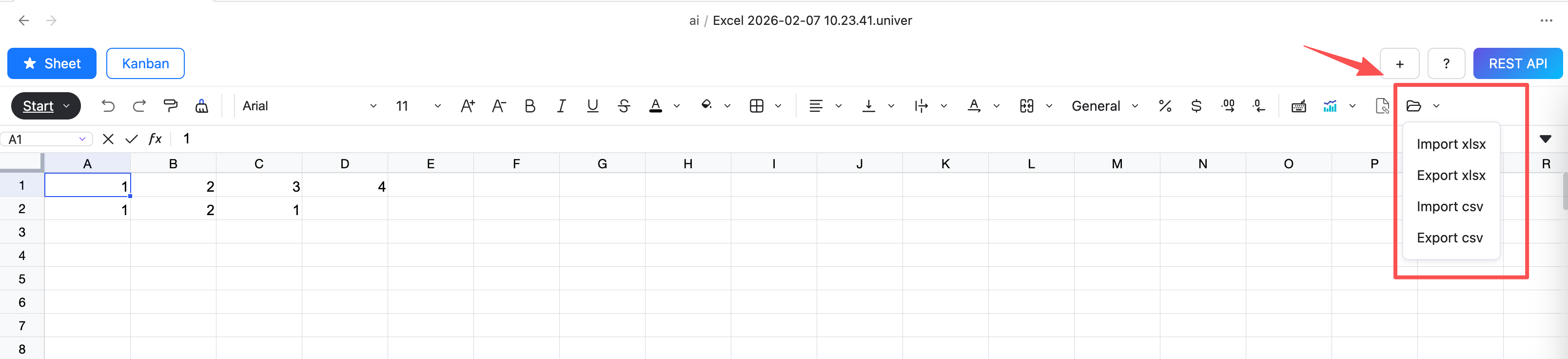
  • Click the import menu in the toolbar

If you don't see the Import button, click the More button and you'll find the Import option in the drop-down menu.

alt text


Step 1 — Click Import

Select the file to import

alt text

Exporting Data


Step-by-Step: Export Data

Step 1 — Open the Sheet

Open the sheet you want to export.


Step 2 — Click Export

Click Export in the toolbar.

alt text


Step 3 — Save File

Choose a location and confirm export.

alt text

Troubleshooting

Import / Export button is disabled

  • Make sure your license is activated
  • Restart Obsidian after activation

Feedback